Writing
Cleaning Up WIP Commits with Git Autosquash
A small git fixup and autosquash workflow for moving temporary WIP changes back into the commits where they actually belong.
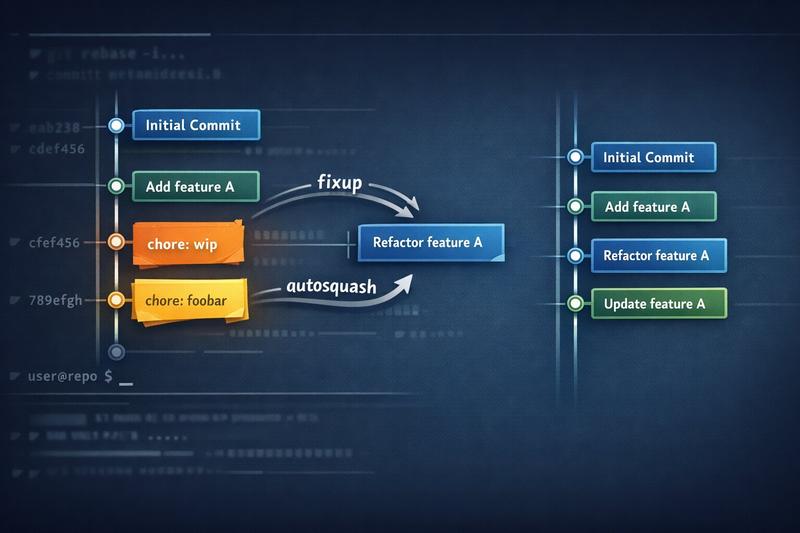
Sometimes I briefly stash changes away in a commit.
Not a proper commit. More like chore: wip, chore: foobar, or whatever name gets the changes out of my working tree for a minute. That is fine while I am still moving things around, but it is not what I want in the final branch.
I even have an alias for it:
wip='git add . && git commit -n -m "WIP: $(date +%Y-%m-%d_%H-%M-%S)"'One side benefit is that the changes have entered Git’s state. If I mess up later, there is a better chance I can recover them again. That is basically the same reason git fsck saved a lost blog post for me.
I recently had exactly that: a branch with a couple of throwaway commits sitting in the middle of the history.
125563386 feat: empty package roots; migrate consumers to subpath imports only
d245cf54b feat: add subpath package exports on auth, query-provider, react, react-ui
de9439c3c chore: wip
5d608e9a7 chore: foobar
1d5d231e0 fix: align imports with Apollo 4 and graphql resolution
3ff5eb65e feat: structured exports and copy package in Vite build
99fd799d4 feat(example-package): dual ESM and CJS output via Rollup
Those two chore commits were not useful on their own. They were just temporary parking spots. What I actually wanted was for their changes to end up in the commits where they belonged.
Fixup Commits
Git has a nice built-in way to say “this commit fixes that older commit” with git commit --fixup:
git commit --fixup 99fd799d4That creates a commit with a message like this:
fixup! feat(example-package): dual ESM and CJS output via RollupThe fixup! prefix is not just decoration. Git understands it during an interactive rebase with --autosquash:
GIT_SEQUENCE_EDITOR=true git rebase -i --autosquash origin/main--autosquash moves the fixup commit directly below its target and marks it as fixup. Setting GIT_SEQUENCE_EDITOR to true accepts the generated todo list as-is, so no editor opens. I also like that I can turn autosquash on by default with rebase.autoSquash.
That is the part I liked. I could let an agent make the small follow-up change, create a --fixup commit against the right SHA, and then run the autosquash rebase. This worked well with tools like OpenCode and Claude Code, where the agent can handle the small mechanical change and I still keep the branch history tidy. The final branch had the fix in the commit that introduced the problem, not in a random “fix lint” commit at the end.
Existing WIP Commits
In my case, I also had the two already-existing chore: wip style commits. They were already directly after the commit I wanted to fold them into, so I used the same interactive rebase trick with a tiny GIT_SEQUENCE_EDITOR override:
GIT_SEQUENCE_EDITOR='python3 -c "
import sys
content = open(sys.argv[1]).read()
content = content.replace(\"pick 5d608e9\", \"fixup 5d608e9\") \
                 .replace(\"pick de9439c\", \"fixup de9439c\")
open(sys.argv[1], \"w\").write(content)
"' git rebase -i origin/main
This just changes two lines in the rebase todo file from pick to fixup. That is intentionally simple, but also important: fixup folds a commit into the commit immediately before it in the rebase todo list. If the WIP commits are somewhere else in the history, the script needs to account for that by reordering the todo file first.
Afterwards, the branch no longer had the throwaway commits in the middle. The changes were folded into the commits they belonged to.
Worktrees Still Exist
Of course, this is not the only way to keep a branch clean.
If I know ahead of time that I need to work on two things in parallel, git worktree is often the nicer tool. Separate checkout, separate working tree, less juggling.
But I do not always plan that well. Sometimes I am already on a branch, I need to park something briefly, and later I want to clean up the history before asking someone to review it. For that situation, --fixup and --autosquash are useful to know about.
How do you keep temporary commits from leaking into review? Do you use worktrees, autosquash, or just clean up with an interactive rebase before pushing?